Integration with CRM SalesDrive for BAS Small Business, BAS KUP, BAS ERP, BAS Accounting, BAS UT 3, UNF, FinLite and other configurations on managed forms. Two-way exchange of BAS with SaleDrive
Standard Integration Functionality:
-
Uploading deals from CRM "SalesDrive" to the BAS database in real-time;
-
Two-way exchange of order statuses between CRM "SalesDrive" and BAS;
-
Automatic creation of counterparties in BAS when uploading a deal from CRM "SalesDrive".
Additional Functionality (paid separately):
- Uploading items/products from CRM "SalesDrive" to BAS while preserving the nomenclature folder structure;
- Exporting items/products from BAS to CRM "SalesDrive";
- Exporting stock balances to CRM "SalesDrive";
- Uploading payments from CRM "SalesDrive" to BAS, linked to customer orders;
- Uploading payment data from BAS to CRM "SalesDrive";
- Uploading payment receipts from CRM "SalesDrive" to BAS;
- Loading additional characteristics of deals from CRM "SalesDrive" to the BAS database:
- Delivery method;
- Shipping/Sender;
- Prom.ua website;
- Website page;
- Advertising campaign;
- Source;
- Company (utm_campaign);
- Channel.
- Using nomenclature characteristics when uploading deals to BAS;
- Exporting prices to CRM "SalesDrive";
- Exporting cost price/prime cost to CRM "SalesDrive";
- Automatic generation of an expense invoice in BAS based on the buyer's order/invoice with the order/invoice status "Shipped";
- Formation of the document "Closing the buyer's order" based on the document "Buyer's order", if the order status is "Cancellation";
- Formation of the document "Invoice for return of goods" in BAS, based on the "Outgoing invoice for goods", if the outgoing invoice exists and the status "Cancellation" appears in the buyer's order.
- Delivery method;
- Shipping/Sender;
- Prom.ua website;
- Website page;
- Advertising campaign;
- Source;
- Company (utm_campaign);
- Channel.
Implemented for configurations:
-
BAS Accounting, edition 2;
-
BAS KUP (Comprehensive Enterprise Management);
-
BAS Small Business;
-
BAS UT (Trade Management);
-
Trade Management, edition 3;
-
UNF (Small Business Management).
Why choose our solution:
- Over 50 integrations in 5 years (we have been working in this area since 2021);
- Ability to change data exchange settings between "SalesDrive" and "BAS" in "Enterprise" operation mode, without using "Configurator". Everything can be configured directly from "BAS Enterprise", including algorithms for filling in attributes, namely:
- matching the document type in "SalesDrive" ("Deal") to the document type in "BAS" ("Sales Order" or other);
- matching the attributes of the "Deal" in "SalesDrive" to the attributes of the selected document type in "BAS";
- matching directory values in "SalesDrive" to directory values in "BAS" (For example: you can map deal statuses in "SalesDrive" to the corresponding sales order statuses in "BAS", and similarly for directories like "Delivery Types", "Payment Types");
- in the "BAS" settings, you can change algorithms and formulas for calculating attributes, as well as the calculation sequence; it is also possible to add virtual attributes to be used in algorithms when filling in other real attributes of the tabular section and header attributes.
- The integration module successfully operates on large volumes of exchanged data - 300 orders per day, 20,000 products for exchange.
- The export of stock balances between "SalesDrive" and "BAS" is carried out only for products from new or modified documents that generate product movement and change warehouse balances.
- Availability of logging for all exchange tasks between "SalesDrive" and "BAS". Each exchange with "SalesDrive" is a separate event characterized by indicators of what information is being sent or received between "BAS" and "SalesDrive", what response was received, which "BAS" database object was modified or created, and the event execution status — "Completed", "Unprocessed", "Error". If it is an error, the specific error details are provided.
- matching the document type in "SalesDrive" ("Deal") to the document type in "BAS" ("Sales Order" or other);
- matching the attributes of the "Deal" in "SalesDrive" to the attributes of the selected document type in "BAS";
- matching directory values in "SalesDrive" to directory values in "BAS" (For example: you can map deal statuses in "SalesDrive" to the corresponding sales order statuses in "BAS", and similarly for directories like "Delivery Types", "Payment Types");
- in the "BAS" settings, you can change algorithms and formulas for calculating attributes, as well as the calculation sequence; it is also possible to add virtual attributes to be used in algorithms when filling in other real attributes of the tabular section and header attributes.
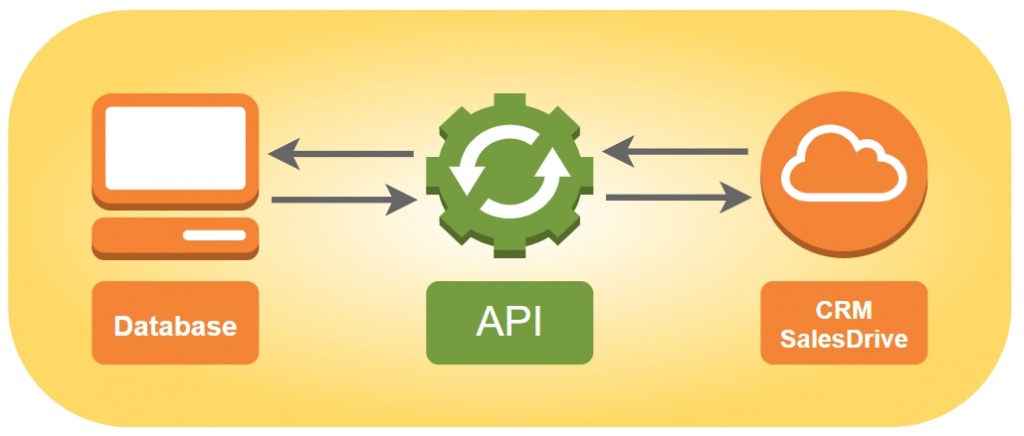
Fig. 1. Exchange scheme with SalesDrive.
The integration functionality includes:
-
Integration with CRM SalesDrive will allow you to upload the application database to BAS and eliminate the double work of manual data transfer.
-
Data synchronization between systems occurs automatically when data changes. There is no need to perform additional exchange.
-
The module for managed forms does not make changes to the BAS configuration. The solution is implemented as an extension, which ensures further technical support of the database from the supplier.
-
The SalesDrive integration module setup takes little time and can be done by the user independently. Flexible settings for the correspondence of requisites in BAS are organized at the database level. No need to work in the configurator and program in the code.
-
Prompt exchange of information on requests, goods and prices allows you to control the balance of goods and generate management reports.
-
Bidirectional data exchange via API creates orders in BAS, exchanges order statuses between BAS and SalesDrive, automatically records contractors, searches for products by article.
-
Additional data exchange contained in the Webhook application is transmitted in the post json format. These are product characteristics, contacts, delivery service data, consignment notes, advertising campaigns, etc.
Integration with CRM SalesDrive will allow you to upload the application database to BAS and eliminate the double work of manual data transfer.
Data synchronization between systems occurs automatically when data changes. There is no need to perform additional exchange.
The module for managed forms does not make changes to the BAS configuration. The solution is implemented as an extension, which ensures further technical support of the database from the supplier.
The SalesDrive integration module setup takes little time and can be done by the user independently. Flexible settings for the correspondence of requisites in BAS are organized at the database level. No need to work in the configurator and program in the code.
Prompt exchange of information on requests, goods and prices allows you to control the balance of goods and generate management reports.
Bidirectional data exchange via API creates orders in BAS, exchanges order statuses between BAS and SalesDrive, automatically records contractors, searches for products by article.
Additional data exchange contained in the Webhook application is transmitted in the post json format. These are product characteristics, contacts, delivery service data, consignment notes, advertising campaigns, etc.
Main functionality capabilities
1. Exchange of requests (orders).
In the "Sales Orders" journal in BAS, orders exported from "SalesDrive" are displayed and marked with a logomark. The journal also duplicates information from the CRM, such as the number, status, payment state, amount, date and time of order creation, and the customer's last and first name.
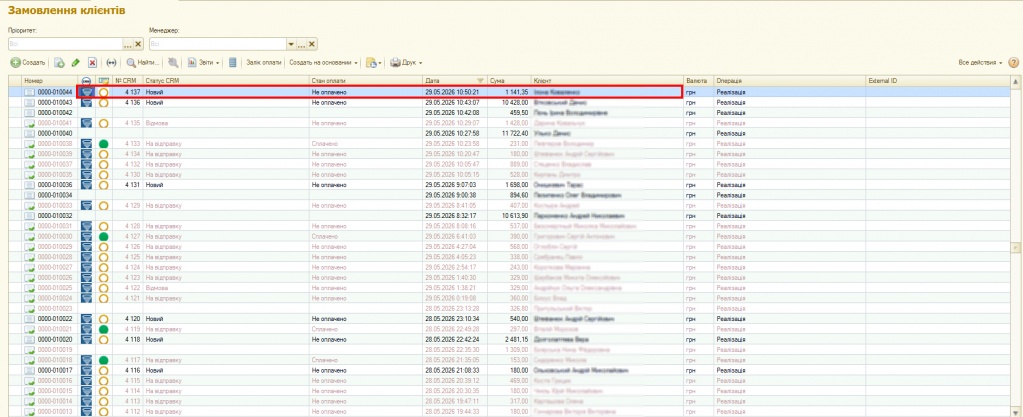
Fig. 1. "Sales Orders" journal in BAS.
2. A request from CRM is recorded in BAS as a "Sales Order" document.
An additional SalesDrive tab appears in the document, along with a link to the request ID and a separate record of the order status.
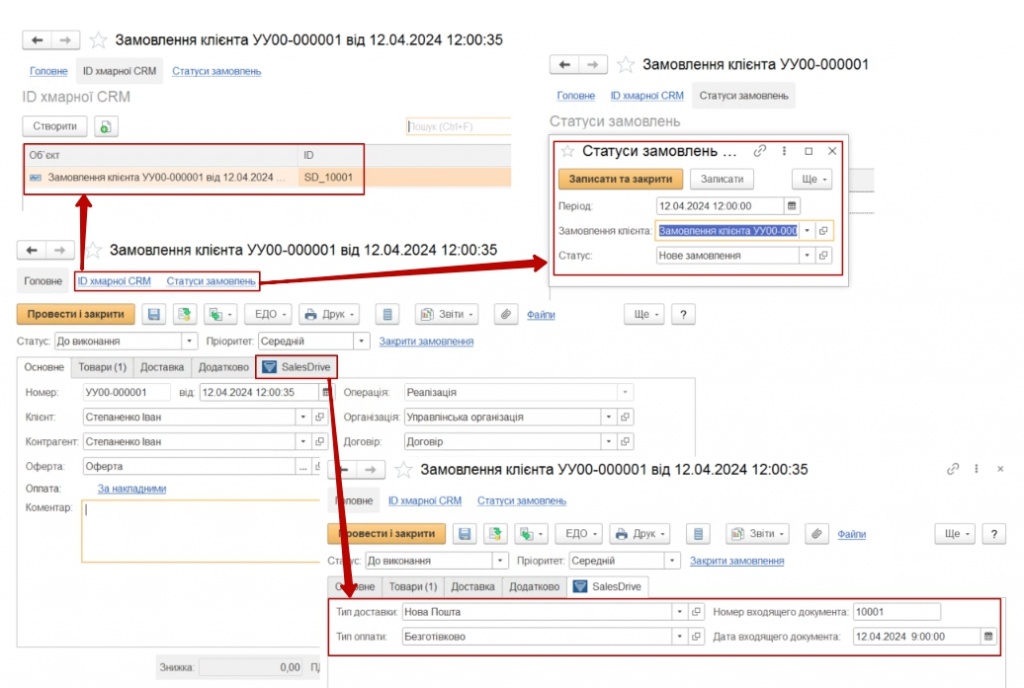
Fig. 2. Sales Order in BAS.
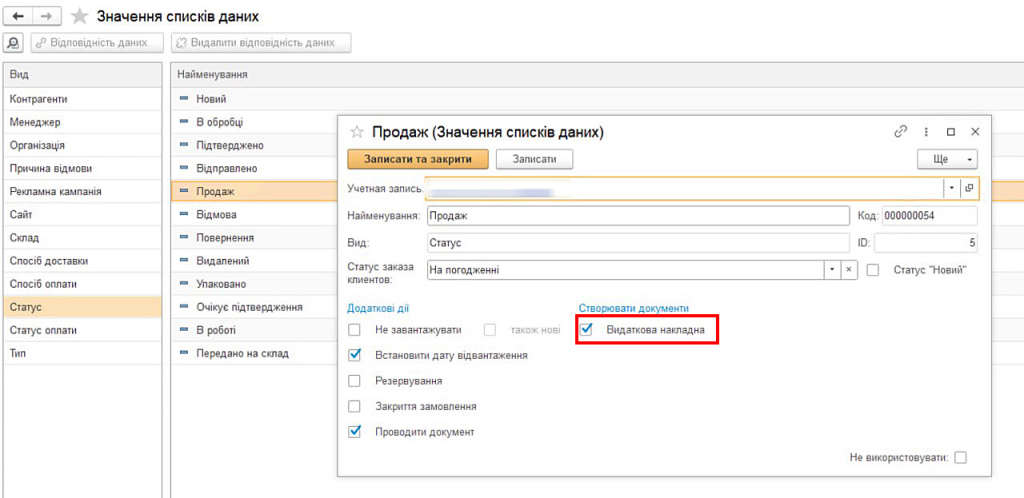
3. In the "Data List Values" journal within the "Directories" section in BAS, you can manually configure additional settings, for example, for the "Sale" status, you can choose the automatic creation of a sales invoice under this order status.
Fig. 3. Additional settings for the corresponding order status.
4. In the "Data List Values" journal within the "Directories" section in BAS, CRM values that have not been mapped to a BAS value are highlighted in pink. To map these values, use the "chain" icon.
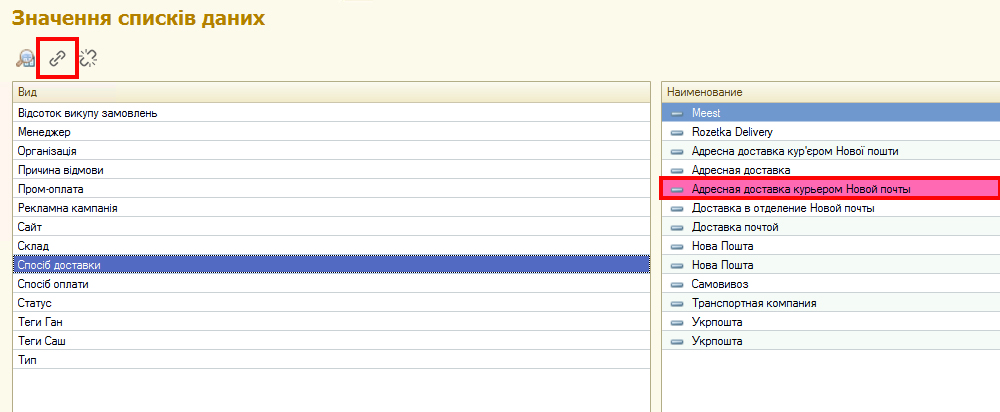
Fig. 4. Setting up data mapping.
5. Product exchange.
Products from the CRM request are recorded into the tabular section "Products of the sales order document".
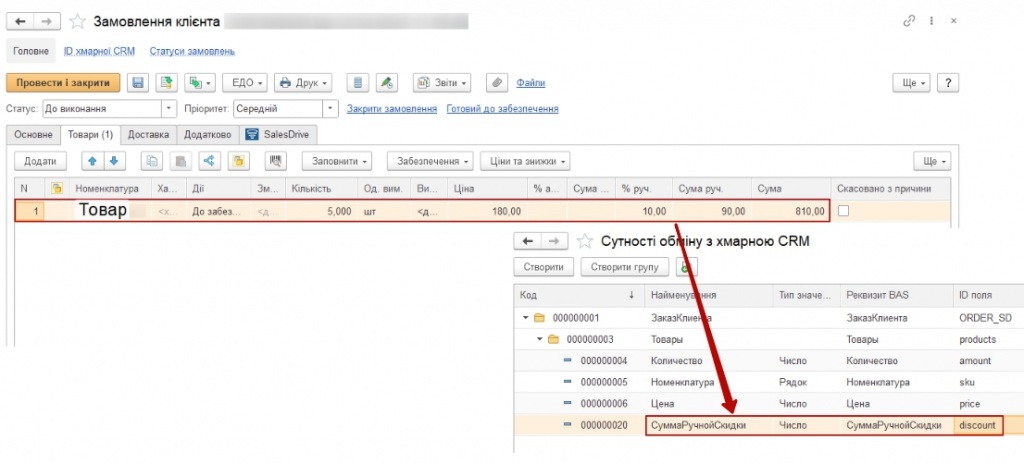
Fig. 5. Products in the sales order.
Products are mapped based on the key SKU field (BAS item number). On the SalesDrive side, the SKU field must be filled in.
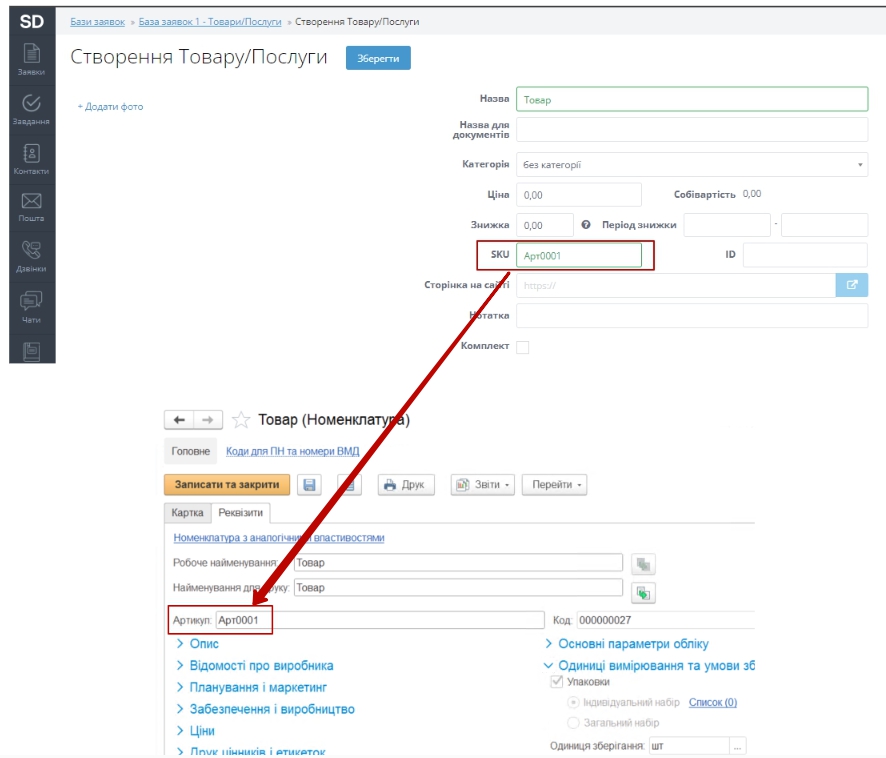
Fig. 6. Filling in product SKUs.
6. Exporting payment data from BAS to "SalesDrive" CRM.
Non-cash payment data from BAS is exported to SalesDrive. The payment is displayed in the customer card within SalesDrive CRM as unlinked to any deals, allowing it to be manually linked to the specific deal for which the payment was made.
7. Integration logging.
In the "Orders" journal within the "Logging" section in "BAS", event statuses are displayed: in green – "Completed", in blue – "Completed without processing", in red – "Execution declined", and in yellow – "Execution errors". The order number, date, and time of the event import and subsequent processing are also displayed.
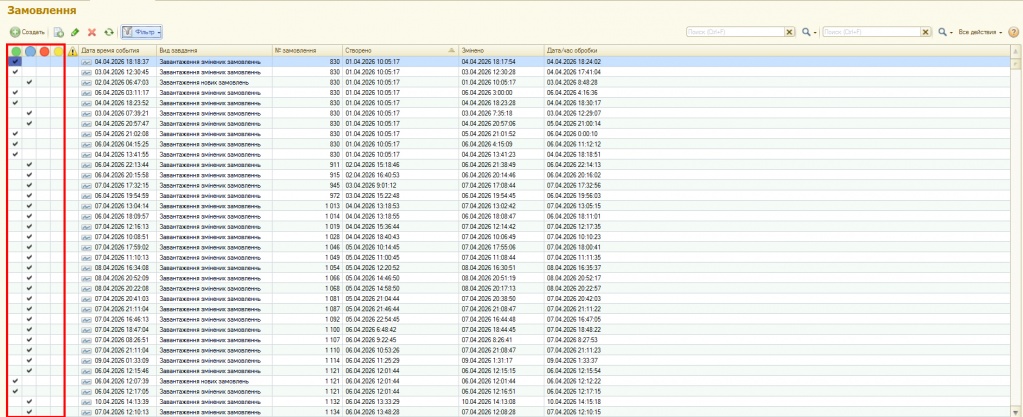
Fig. 7. "Orders" journal in the "Logging" section.
8. From the "Orders" journal in the "Logging" section in "BAS", you can open the order data, where the processing result will be visible, and you can navigate directly to the "Order" document itself.
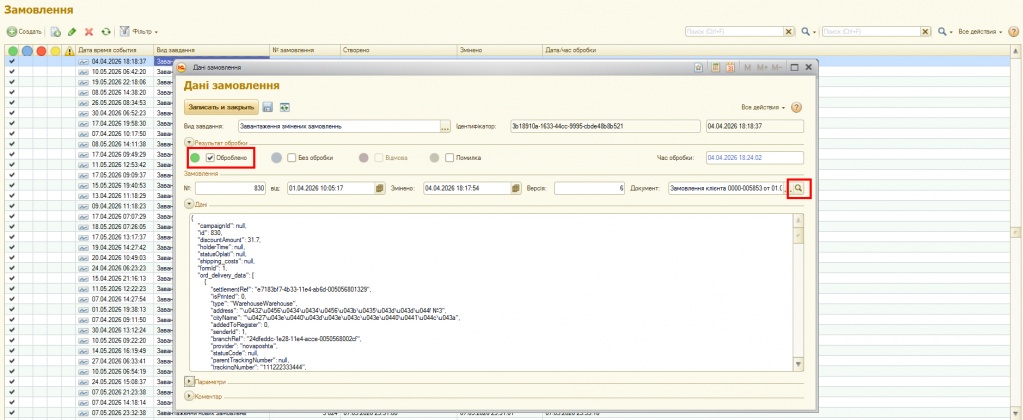
Fig. 8. Order data in the "Logging" section.
9. In the "Tasks" journal within the "Settings" section in "BAS", the tasks that can be included in the integration are displayed. Inactive tasks are shown as strikethrough text.
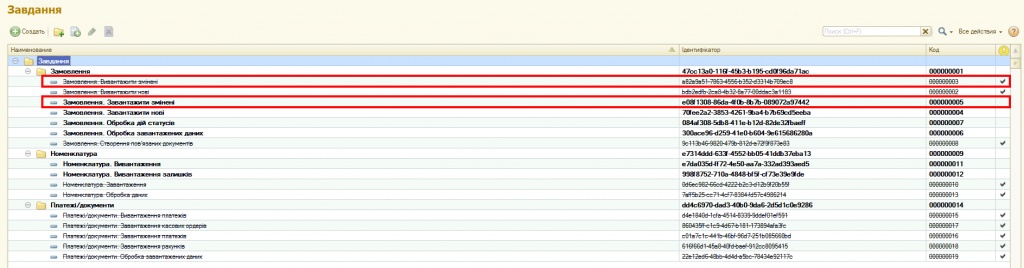
Fig. 9. Tasks available for integration.
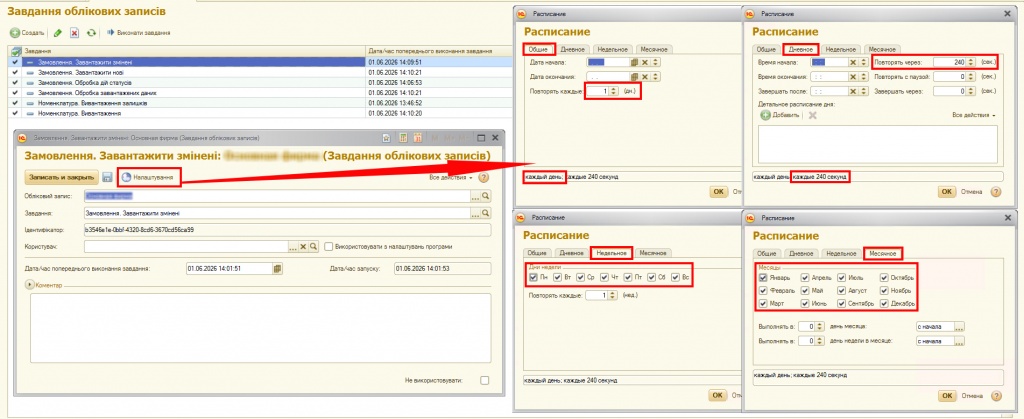
Fig. 10. Configuring account tasks.
11. In the "Events" journal within the "Logging" section, all events resulting from the exchange between "BAS" and "SalesDrive" are displayed. You can conveniently sort them by values:
-
"Orders. Sending modified",
-
"Orders. Status actions",
-
"Orders. Creation of related documents",
-
"Products. Sending changes",
-
"Products. Sending stock balances".
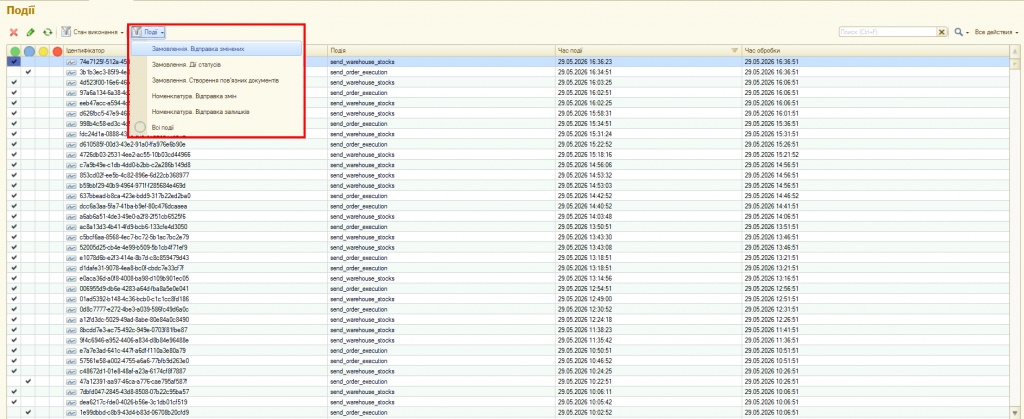
Fig. 11. "Events" journal in BAS.
12. In the "Events" journal within the "Logging" section, all events resulting from the exchange between "BAS" and "SalesDrive" are displayed. If you open an event, you can view exactly which document triggered it and, for example, which products were involved (they are displayed in SalesDrive ID format).
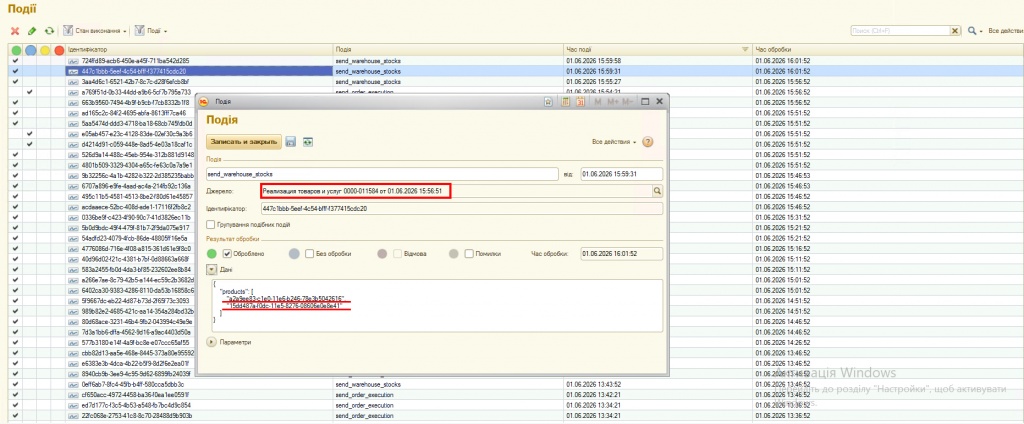
Fig. 12. Additional event information.
The extension logs the entire exchange process. The user can verify all the data being transferred from the request to the order.
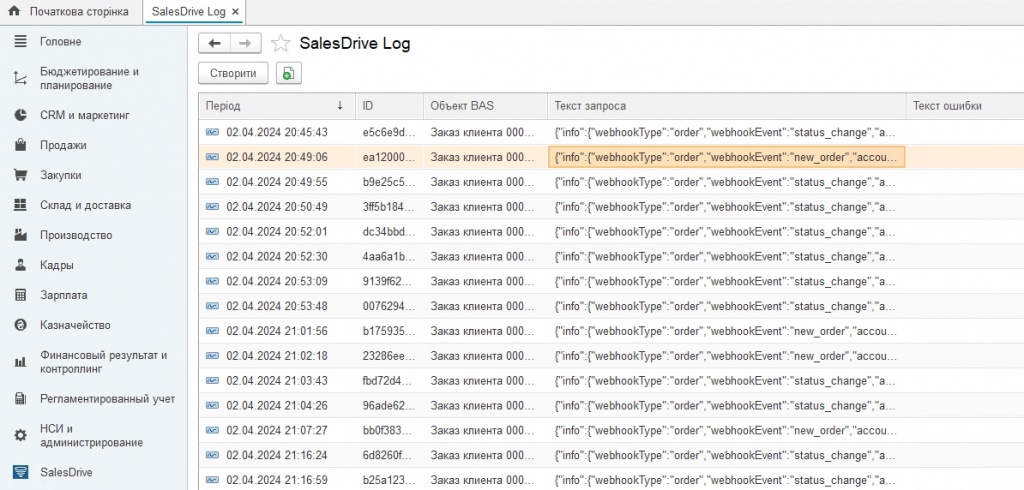
Fig. 13. Exchange logs.
Main principles of module configuration
1. Exchange parameters are set in the SalesDrive settings.
Customer exchange can be carried out for one specific counterparty in BAS specified in the parameters, or new ones can be created. If it is necessary to receive the order number when a status changes, the corresponding checkbox is selected. Unchecking the box for creating/modifying orders stops the document exchange.
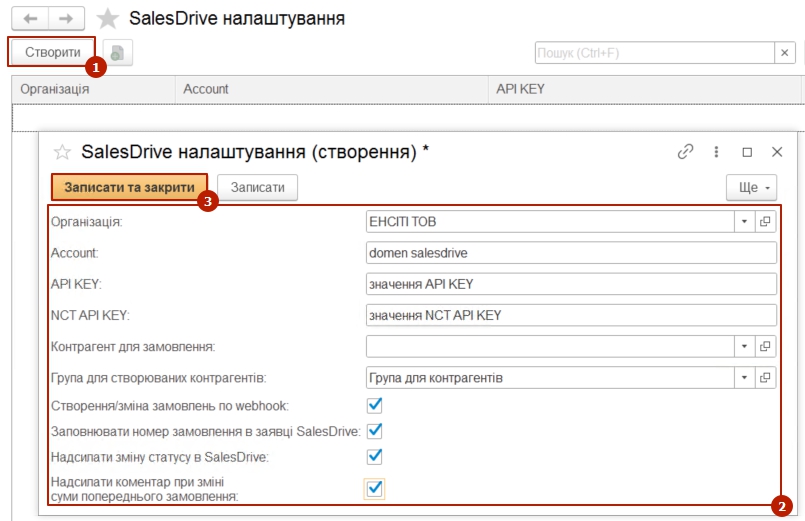
Fig. 1. Creating a record with SalesDrive module settings.
The API interface does not support editing the order amount during the reverse exchange from BAS to the cloud CRM. A note is recorded in the BAS comments, adding the line "Attention: order amount changed – 0000.00 UAH.", and the comment value is sent to SalesDrive.
2. Configuration of the exchange entity.
Attributes exchanged with the cloud CRM are added to the exchange entity. A specific feature of filling this in is assigning the ID of the corresponding field transmitted in the post json format. Field names are contained in the data description on the SalesDrive system side (Settings – General Integration Settings – Other Services – Webhook section).
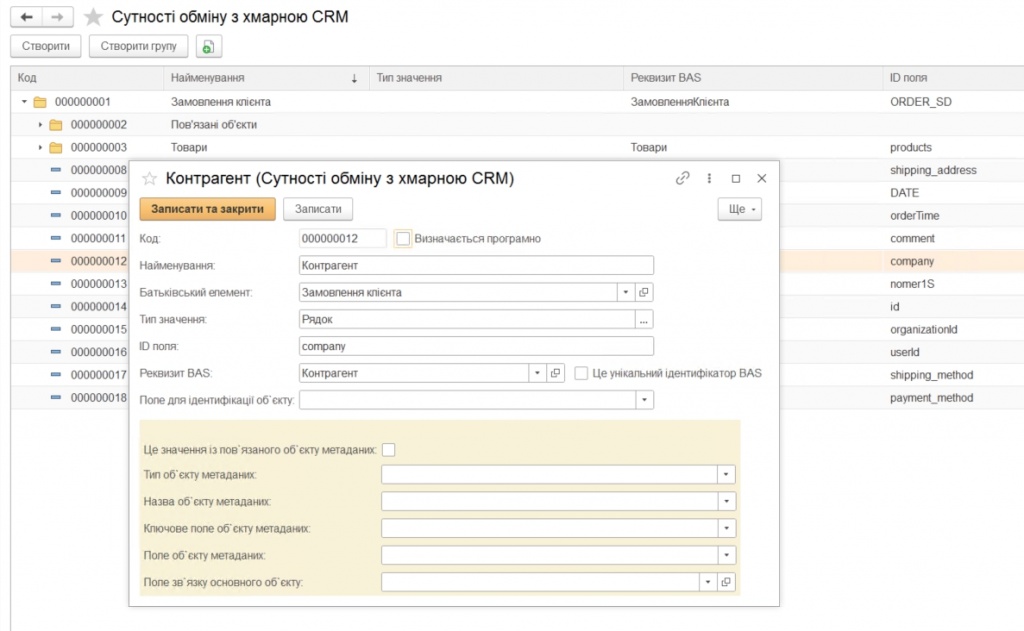
Fig. 2. Creating a "Counterparty" item in the exchange entity.
In the exchange entity, a "Related Objects" group and a new "Status" item are created.
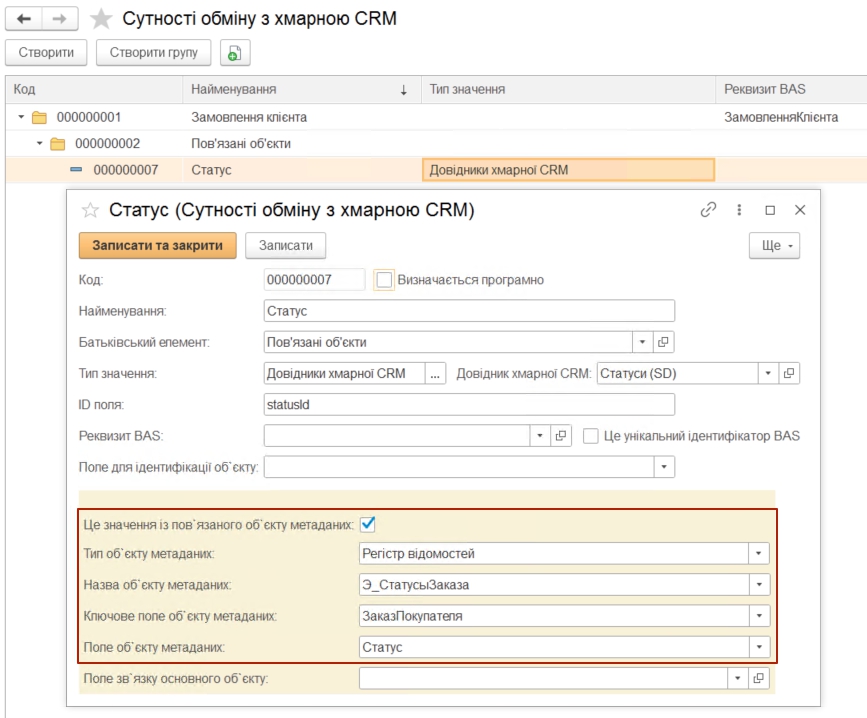
Fig. 3. Creating a "Status" item in the exchange entity.
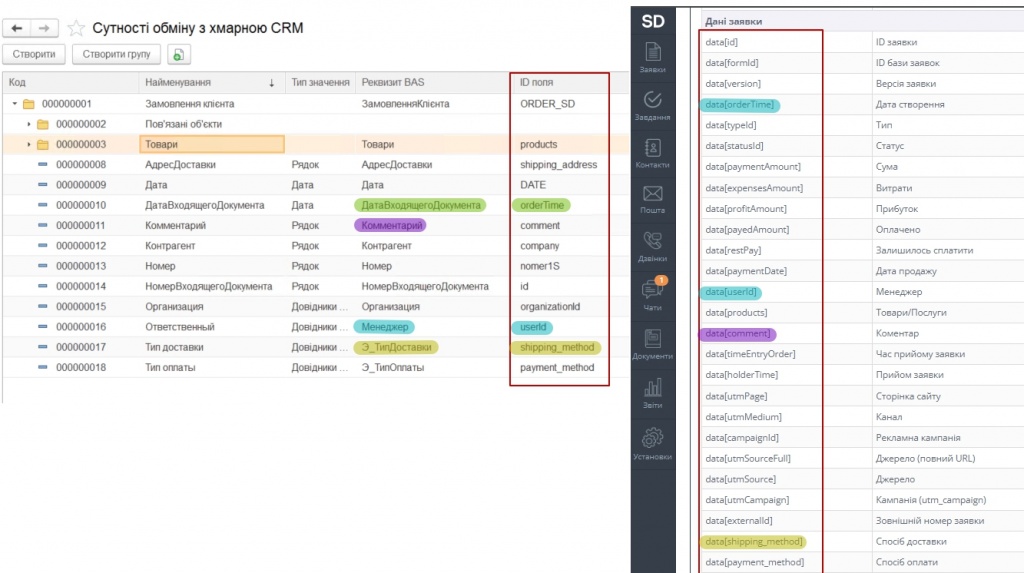 Fig. 4. Field ID names for recording in the exchange entity.
3. Directories and filling them in.
The module includes the following directories: "Order Statuses", "Delivery Types", and "Payment Types".
Values from the corresponding sections of SalesDrive CRM are added to these directories.
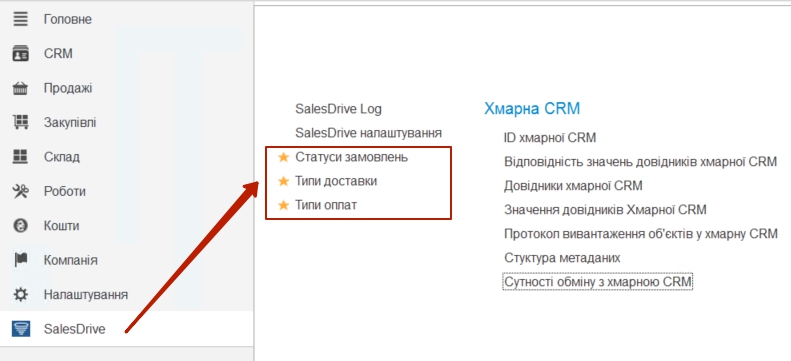
Fig. 5. Directories to be filled in.
An example of filling in the "Order Statuses" directory.
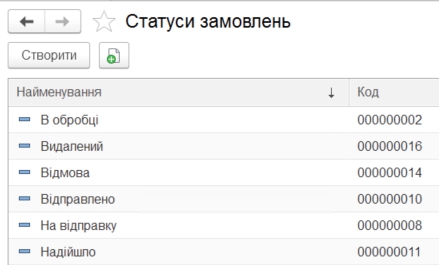
Fig. 6. "Order Statuses" directory.
4. Mapping directory values between BAS and SalesDrive.
For each value from the cloud CRM, a corresponding record must be created for the value in the BAS system across all directories.
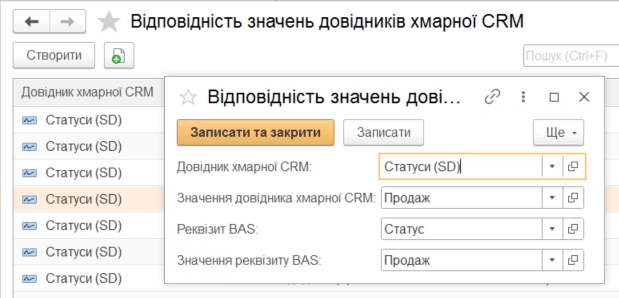
Fig. 7. Setting up directory value mapping.
Solution cost:
|
Cost of standard functionality |
12000.00 | |
|
|
|
|
|
Cost of additional functionality
|
Price, UAH | |
| 1. | Importing products from "SalesDrive" CRM into BAS while preserving the directory folder structure | 4000.00 |
| 2. | Exporting products from BAS to "SalesDrive" CRM | 3000.00 |
| 3. | Exporting stock balances to "SalesDrive" CRM | 3000.00 |
| 4. | Importing payments from "SalesDrive" CRM into BAS, linked to customer orders | 4000.00 |
| 5. | Exporting payment data from BAS to "SalesDrive" CRM | 4000.00 |
| 6. | Importing payment receipts from "SalesDrive" CRM into BAS | 3000.00 |
| 7. | Importing additional deal characteristics from "SalesDrive" CRM into the BAS database | 3000.00 |
| 8. | Using product characteristics when importing deals into BAS | 8000.00 |
| 9. | Exporting prices to "SalesDrive" CRM | 3000.00 |
| 10. | Exporting cost of goods sold (COGS) to "SalesDrive" CRM | 2000.00 |
| 11. | Automatic generation of a sales invoice in BAS based on a customer order/invoice when the order/invoice status changes to "Ship" | 3000.00 |
| 12. | Generation of a "Customer Order Closure" document based on the "Customer Order" document if the order status is "Cancelled" | 2000.00 |
| 13. | Generation of a "Sales Return" document in BAS based on the "Sales Invoice" if the invoice exists and the customer order status changes to "Cancelled" | 3000.00 |
Module rights are protected (certificate No. 139214). We provide favorable terms of cooperation for partners.
Register if not registered and log in to add a review.
- Integration of "BAS KUP" with CRM "SalesDrive".
- Comments